Understand wallet billing and usage
Read available balance, reservations, usage charges, amounts owed, and top-up details without confusing them.
Separate the costs
Keep your CookMyBots wallet funded for paid work. Your balance pays for builds and edits, hosting, customer AI replies, X API usage, and other metered services. As the bot owner, you also pay for billable features your customers use through the bot.
| Service | What uses your balance |
|---|---|
| BOTS SI | Billable planning, builds, edits, repairs, conversations, and research. |
| Hosting | Keeping the published bot running, including when no messages arrive. |
| Customer AI and paid tools | AI replies, media, transcription, and other billable abilities used by the bot. |
| X API | Billable API reads and writes, separately from AI and hosting. |
| WhatsApp session bots | The bot’s hosting and paid AI or tools used in WhatsApp conversations. Pairing does not include unlimited service usage. |
Connecting an account or installing an ability does not prepay its ongoing costs. The same usage rules apply to Telegram, X, WhatsApp, Mini Apps, games, and Hybrid bots. An imported bot avoids a new creation request, but its hosting, edits, and paid features still use your funds.
Actions described as free remain free, such as reading documentation, importing an available bot, or reviewing saved checks without starting new AI work. A feature’s setup and pricing information explain whether it has a separate usage charge.
There is no single fixed price for every bot or conversation. Work complexity, actual usage, chosen ability, and the applicable pricing rules affect the charge. Service markups and platform fees may apply. Read the current quote or approval information and the settled usage details, rather than assuming a base rate includes every fee.
Available balance and reservations
Available to spend is the amount available for new work after relevant amounts owed and active reservations. Reserved for work in progress is already excluded from that figure. A reservation holds funds while work is happening; it is not itself a final charge. Settlement records actual usage and releases an unused reservation when appropriate.
A failed or cancelled attempt can still incur charges for usage already performed. A failed result does not automatically refund incurred usage. Unused reserved funds are released after settlement; uncertain usage may need review before its final charge or release is known.
Runtime usage awaiting settlement lists reserved operations. An uncertain result may stay Awaiting review while CookMyBots determines whether it should be charged or released. Do not start repeated copies of the same paid request because a response was slow. Check its status and recorded activity first.
Amounts owed and a negative balance
Costs from already-authorized work can still be recorded when available balance is exhausted. A build, edit, or other approved operation can finish within its spending limit while the account becomes negative. A reservation is an estimate held for work in progress, not a guarantee of the final price.
New paid requests are blocked when available funds are exhausted or the account’s net balance is negative. This includes new builds, edits, customer AI replies, and other paid service calls. Your next top-up repays the amount owed first; only the remaining funds, after other reservations, are available for new spending.
For example, a wallet balance of -$2 followed by a $10 top-up leaves $8 before other charges or reservations. A top-up smaller than the amount owed can leave the account negative.
Hosting uses the wallet too
Active bot hosting is paid from your wallet separately from builds, edits, and runtime service calls. When usable funds run out, a running bot has a 48-hour payment grace period. Hosting continues to accrue during that period, and unpaid hosting is shown as Hosting owed.
Balance after hosting owed deducts that separate amount from the wallet balance and can be negative. At the payment deadline, hosting can be suspended until payment and recovery requirements are met. The payment window does not make new paid AI or service requests available without funds.
A confirmed top-up pays hosting owed first. CookMyBots attempts to resume a bot suspended for billing when eligible; a bot you manually paused stays paused. See Hosting charges and the 48-hour grace period for the full steps and partial-payment rules.
Top up and investigate a charge
- Open Billing and review available funds, reservations, and any amount owed.
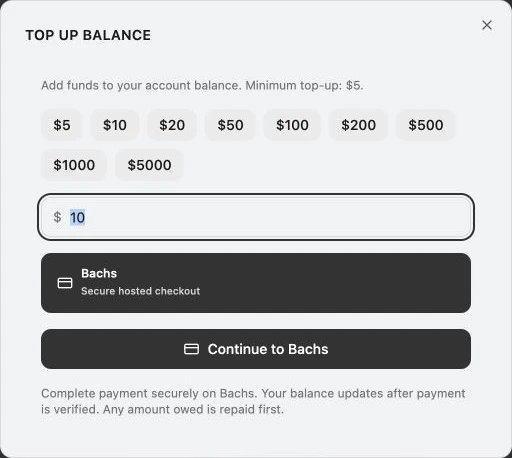
- Select Add funds and choose among the offered methods. Review the displayed minimum and payment information.
- Complete payment through the offered payment flow and wait for verification. A started payment is not yet a confirmed wallet credit.
- Use date ranges, categories, and bot spending details to locate usage. Read the recorded breakdown for base usage, markup, and any platform fee.
Use Refresh to retrieve current balances and recorded activity. Export CSV downloads records matching your selected filters. Totals and exports cover the full recorded history within those filters; Load older activity expands the visible activity list.
A checkout return or success page alone does not confirm wallet credit. Wait for payment verification, then refresh Billing. If payment completed but the credit is missing, keep the checkout or order reference and contact support before paying again. Do not include private payment credentials in your report.
Some accounts show separate existing plan credits for eligible builder work. Runtime services use the wallet. Historical charges retain their recorded pricing.
Signup credit is promotional, depends on the offer enabled at registration, and may be unavailable. Returning sign-ins do not earn a new signup grant. In the profile menu, Referral link copies your invitation; Redeem referral accepts a valid code once per account and rejects your own code. Reward amounts depend on the current offer and successful redemption.
Opening a referral link and signing in also attempts to apply its code. A valid redemption can reward both accounts according to the current offer. Check Billing for the recorded credit.